Transformations
Machines and sensors deliver raw signals: a pulse, an on/off bit, a status text, a value in tenths. Raw signals are rarely what you want on a dashboard. Transformations convert values into usable production data, directly at the source.
Doing this at the source has a big advantage: the data in UpBlue is already clean. Dashboards stay simple, and everyone that uses the data gets the same, correct numbers.
Transformations are set per rule, in the section “Transform values”. A rule can have multiple transformations. They run in order: the output of one is the input of the next. Drag transformations to change the order.
For example: Text to value (turn RUNNING into 1) → Timer (measure how long the machine runs) → Deduplication (only store changes).
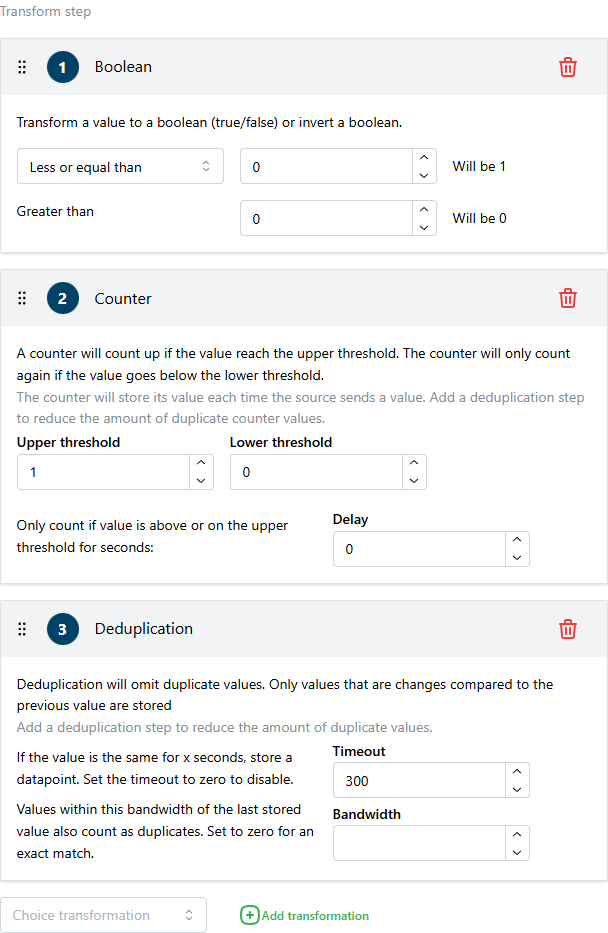
Every new rule starts with a Deduplication transformation. Most of the time that is what you want: it keeps your data clean without losing information.
Deduplication
Most machines report the same value over and over. A temperature that is polled every second produces 86.400 datapoints per day, even if it barely changes. Deduplication only stores a value when it changes. This keeps the database fast and your data readable, without losing information.
| Option | What it does |
|---|---|
| Timeout | Store a value anyway if it has not changed for this many seconds. Default 300. This heartbeat shows the tag is still alive, and keeps time-based dashboard calculations correct. |
| Bandwidth | Treat values within this range of the last stored value as unchanged. For example bandwidth 0.5 on a temperature: 21.1 → 21.3 is not stored, 21.1 → 21.8 is. 0 means: only exactly equal values are duplicates. |
Do not set the Timeout to 0 (disabled) if you use the tag in time-window calculations on dashboards. Those calculations need at least one datapoint per time window.
Counter
Counts how often something happens. Perfect for counting products: a sensor gives a pulse for every product that passes, the counter turns the pulses into a total.
The counter counts +1 every time the value rises above the upper threshold, and arms again when the value drops below the lower threshold. Two thresholds prevent double counting on a noisy signal.
| Option | What it does |
|---|---|
| Upper threshold | Count when the value rises above this. |
| Lower threshold | The value must first drop below this before the next count. |
| Delay | Only count if the value stays above the upper threshold for this many seconds. Use this to ignore short spikes. |
Count pulses at the source with this transformation, not afterwards in a dashboard. The transformation sees every pulse; a dashboard only sees stored datapoints.
Timer
Measures how long something is active, in seconds. Perfect for measuring runtime and downtime: feed it the on/off signal of a machine and it reports how long the current run has lasted.
The timer starts when the value rises above the upper threshold and resets when it drops below the lower threshold.
| Option | What it does |
|---|---|
| Upper threshold | Start timing when the value rises above this. |
| Lower threshold | Reset when the value drops below this. |
| Delay | Only report if the run lasts at least this many seconds. Short runs are ignored. |
| Only maximum value | Only store the final length of each run, at the moment it ends. Useful for reporting “this run took 5.310 seconds” instead of a growing timer. |
Text to value
Machines often report status as text: RUNNING, STOPPED, ERROR. Text can be stored, but no calculations can be done on text in dashboards. This transformation maps each text to a number.
You can map text to a value like so:
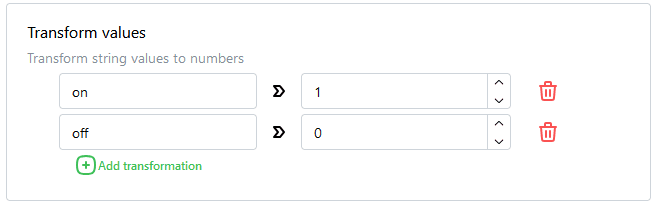
For example: RUNNING → 1, STOPPED → 0, ERROR → -1. Now you can calculate uptime from it.
A text that is not in the mapping is dropped. Add a mapping for every status the machine can report.
Boolean
Turns a measured value into a clean 1 or 0. The classic use: a machine has no “running” signal, but it has a speed or a motor current. “The line runs when the speed is greater than 10” — Boolean makes that a 1/0 tag you can use for uptime and OEE.
| Option | What it does |
|---|---|
| Method | Greater or equal than (value ≥ upper → 1) or Less or equal than (value ≤ lower → 1). The second can also be used to invert a signal. |
| Upper value | Above this the output is 1. |
| Lower value | Below this the output is 0. |
Choosing the upper value a bit higher than the lower value gives a small dead band, so a value that hovers around the threshold does not flicker between 0 and 1.
Filter
Drops values that are clearly wrong. A sensor glitch that reports 9999 °C ruins the scale of every chart it appears in. Filter removes such values before they are stored.
| Option | What it does |
|---|---|
| Method | Greater than: values above the threshold are dropped. Less than: values below it are dropped. |
| Value | The threshold. |
Calculation
Simple math on every value: multiply, divide, add or subtract by a fixed number. Use it to fix units at the source: an energy meter that reports in tenths of a kWh gets a “divide by 10”, a temperature in Fahrenheit… better to fix that here than in every dashboard.
| Option | What it does |
|---|---|
| Method | Multiply (×), Divide (÷), Add (+) or Subtract (−) |
| Value | The fixed number to calculate with. |
JSON filter
For connections that receive JSON messages (MQTT, Webhook and WebSocket). Only messages that match a condition are processed; the rest is ignored by this rule.
Use it when one topic or webhook carries different kinds of messages. For example, only process messages where type equals measurement:
{
  "type": "measurement",
  "value": 21.2
}| Option | What it does |
|---|---|
| Path | The JSON field to look at, for example type or meta → type for nested fields. |
| Condition | Equals, Not equals, Contains, Not contains or Exists. |
| Value | The value to compare with. |
JSON to value
For connections that receive JSON messages. Picks the datapoint value out of the JSON payload.
For example, the message is:
{
  "value": 21.2,
  "tag": "temperature"
}
Set the path to value and the datapoint value becomes 21.2. For nested fields, add multiple keys to the path: values → temperature.
Without this transformation, the whole payload is treated as the value — which is fine when the message is just a number, like 21.2.
A message with values for multiple tags? Create one rule per value, each with its own JSON to value path.